
Step-by-Step Access Guide
1) Directions & Site Address
Zone A:
Blue Bear Self Storage,
Clifton Road, Huntingdon, PE29 7EJ
Zone B:
Blue Bear Self Storage,
Windover Road, Huntingdon, PE29 7DX
2) Accessing the Site
There are two ways to access the site. Choose either method below.
Option A — Access via Keypad
- Drive up to the gate.
- Enter your Main Gate Code on the keypad (on your right-hand side).
-
Press Enter.

Option B — Access via the Bear Box Access App
- Drive up to the gate.
- Download the Bear Box Access App from your app store.
- Enter Site ID: 438
- Enter your Unit Number and Main Gate Code.
- Tap Save, then open the gate from the app.
App store links: Google Play · App Store

3) Finding Your Container
- Containers are in numerical order.
-
Match the Container Number in your confirmation email.


4) Opening the Container Doors
- Always open the right-hand door first.
- Lift the metal clips above the handles on the right-hand door.
- Push the handles up to release, then pull them towards you (like a rowing motion).
- Get both handles to a 90° angle (pointing straight out) before pulling the door open.
Need more help? See “Opening Container Doors” and “Doors Jammed?” videos
5) Pick Up Padlock
- Collect the large padlock and keys from the floor of the container.
- To use: turn the key and pull the bar down on the padlock.
6) Load Your Container
Load your items safely and evenly. Keep walkways clear and stack heavier items at the base.
7) Closing the Container Doors
- Hold the handles straight out at 90° and push the door closed.
- Start with the left door: push handles back toward the container.
- Look up and ensure the hooks slot in above the door.
- Push handles until they drop back into their holders; repeat for the right-hand door.
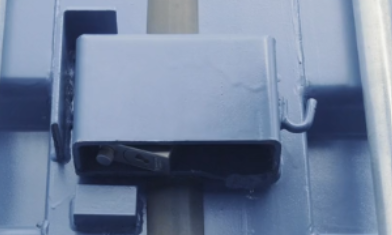
8) Securing Your Container (Lock Box)
- The lock box is in the centre between the two doors.
- Place your hand under to feel for the bar and hole.
- Slide the padlock under the lock box and hook it over the bar.
- Ensure the padlock key is turned; then push the bolt up.
-
Turn the key and remove it to finish.
9) Exiting the Site
- Main gates will usually open automatically.
- If not, enter your gate code on the exit keypad.
10) Moving Out of Your Container
- No Notice is required to leave, we recommend this is done as close to your next payment date as possible.
- When you leave, place the large padlock and keys back inside the container.
- Rented padlock? You must return the padlock and both sets of keys by leaving them on the unit floor when you move out. If not returned or lost, a replacement charge of £49.17 + VAT applies.
- Once vacated, simply compete your vacation via our customer portal: https://customer.bluebearstorage.co.uk/login
- See section 12 of our terms and conditions for more information: Terms and Conditions
Need Help?
Email: info@bluebearstorage.co.uk
Phone: 02039 812900
Comments
0 comments
Please sign in to leave a comment.